WHM Panel
How to Automatically Update Product Prices
How to Automatically Update Product Prices WHMCS can automatically retrieve currency exchange rates and update product prices on a daily basis. This allows your prices to change alongside currency fluctuations. Configure Automatic Price Updates…

How to Automatically Update Product Prices
WHMCS can automatically retrieve currency exchange rates and update product prices on a daily basis. This allows your prices to change alongside currency fluctuations.
Configure Automatic Price Updates
To configure WHMCS to automatically update your product prices:
1. Go to Configuration > System Settings > Automation Settings.
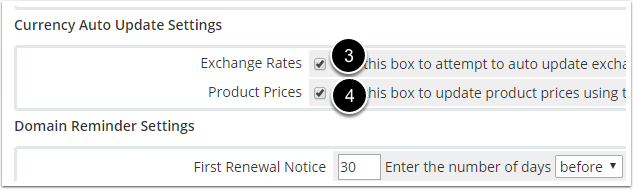
2. Scroll down to the Currency Auto Update Settings section.
3. Check Exchange Rates.
4. Check Product Prices.
5. Click Save Changes.
Related Articles