WHMCS
How to Customize Domain Categories
How to Customize Domain Categories Domain categories group domain TLDs into categories on the domain registration page (cart.php?a=add&domain=register). This makes it easier for clients to find their ideal domain extensions. You can add and…

How to Customize Domain Categories
Domain categories group domain TLDs into categories on the domain registration page (cart.php?a=add&domain=register). This makes it easier for clients to find their ideal domain extensions.
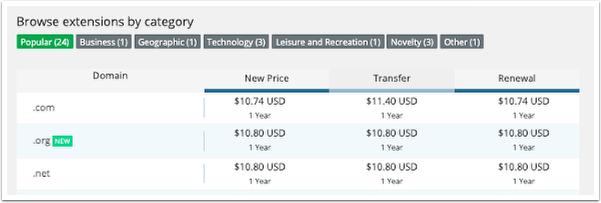
You can add and customize categories by creating a customization file.
Customize Domain Categories
To customize a category:
1. Create a categories.json file in the /resources/domains/ directory.
2. Using your preferred code or text editor, add the domain categories you wish to use in a JSON array format. For example, the array below defines a Domains A-F category.
{
    "Domains A-F": [
        ".biz",
        ".ca",
        ".club",
        ".cn",
        ".com",
        ".co.uk",
        ".de",
        ".eu"
    ]
}
3. Save the file.
Related Articles