WHMCS
How to Configure cPanel Site Software to Offer WHMCS
How to Configure cPanel Site Software to Offer WHMCS cPanel, L.L.C. deprecated the Site Software feature in cPanel & WHM version 104. We recommend performing a manual installation instead. You can install WHMCS using cPanel's Site Software feature. Before you…

How to Configure cPanel Site Software to Offer WHMCS
cPanel, L.L.C. deprecated the Site Software feature in cPanel & WHM version 104. We recommend performing a manual installation instead.
You can install WHMCS using cPanel’s Site Software feature. Before you can perform the installation, a WHM user must enable WHMCS for installation.
The steps below require a server that runs cPanel & WHM 76 or higher.
Enable WHMCS in Site Software
To enable this:
- Log in to WHM.
- Go to cPanel >> Install cPAddons Site Software.
- Check WHMCS under Installed.
- Click Update cPAddon Config.
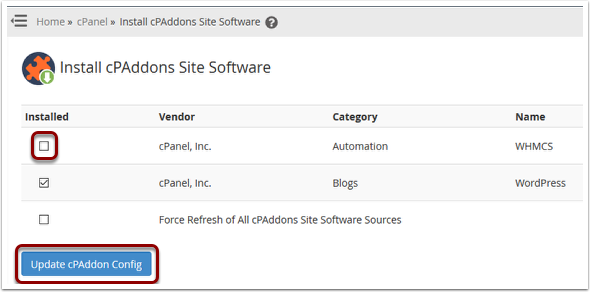
Once the process finishes successfully, WHMCS will be available for installation via cPanel.

Related Articles