cPanel Complete Tutorials
Home – cPanel
Once you are logged into cPanel dashboard, you will see that it has so many options. In this chapter, you will find a quick brief of every option shown in the cPanel dashboard. Sidebar…
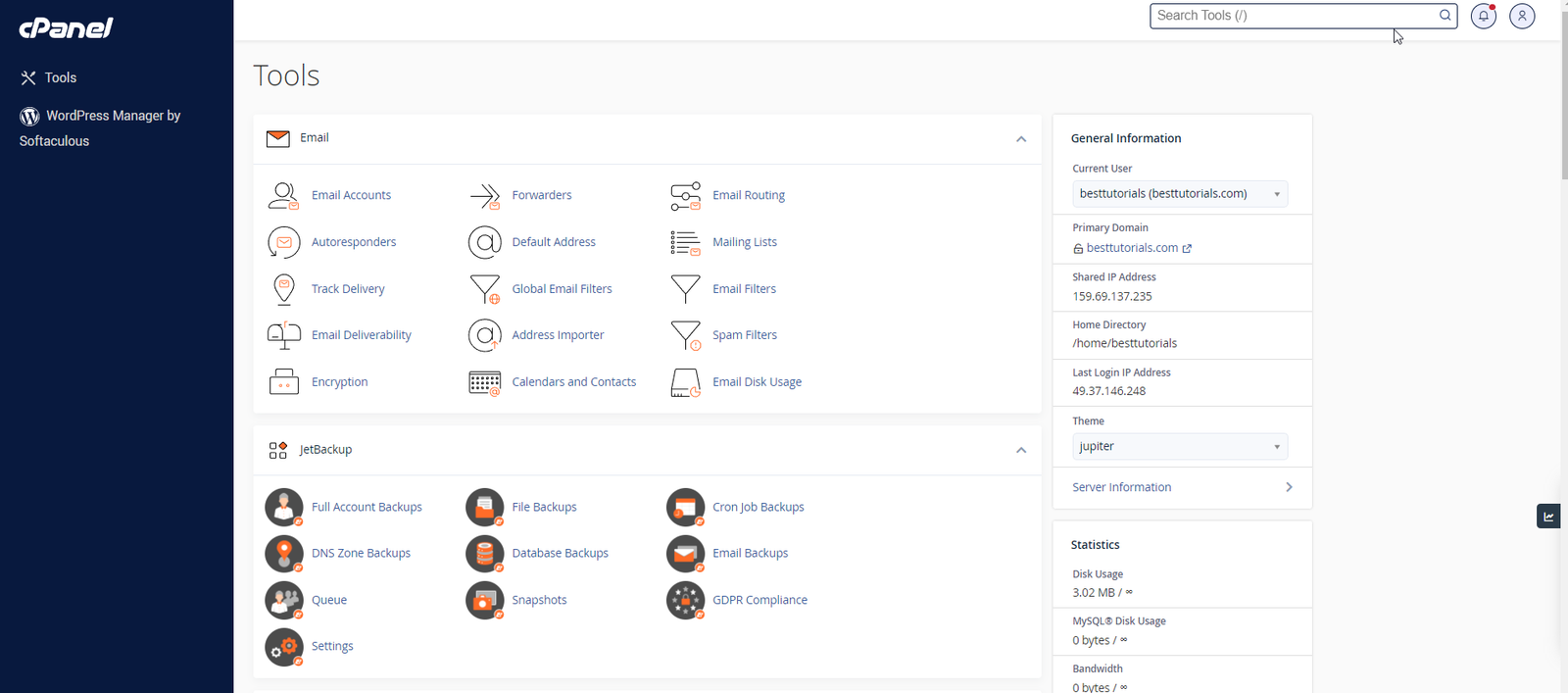
Once you are logged into cPanel dashboard, you will see that it has so many options. In this chapter, you will find a quick brief of every option shown in the cPanel dashboard.

Sidebar
You can switch to your accounts’ four main areas of cPanel through this interface, which are −
- Home − This is where you can access all the features of cPanel.
- Statistics − Displays information about your cPanel account and also the resources it used.
- Dashboard − Displays quick links to change styles etc. and overview of your cPanel account.
- User manager − Here you can manage the users of your cPanel account.
Navigation Bar
On this toolbar, you will find the cPanel’s logo and a search box in which you can type any function of cPanel to access it quickly. Like your User account name and some quick links, once you click on it. The Notification Icon will show you the recent notifications about your cPanel account. Logout button will end your session (log you out) from the cPanel.
Feature List
It displays all the features and functions you have in your cPanel. You can click on any function and it will take you over to the desired functions interface.
Related Articles