WHMCS
How to Create Your First Plesk Server
How to Create Your First Plesk Server Before you can sell and provision hosting accounts, you must add at least one server to your WHMCS installation. The steps below create a Plesk server in…

How to Create Your First Plesk Server
Before you can sell and provision hosting accounts, you must add at least one server to your WHMCS installation. The steps below create a Plesk server in WHMCS.
Creating a Plesk Server
To add your server to WHMCS:
1. Create an API token on the Plesk server. For steps to do this, see Plesk’s documentation.
2. Log in to the WHMCS Admin Area.
3. Go to Configuration > System Settings > Servers (Setup > Products/Services > Servers in WHMCS 7.10 and earlier).
4. Click Add New Server.
5. Select Plesk for Module.
6. Enter the server hostname or IP address and your Plesk reseller username and password.
7. If you have a non-standard (8443) port for Plesk, enter the port number in the Access Hash section.
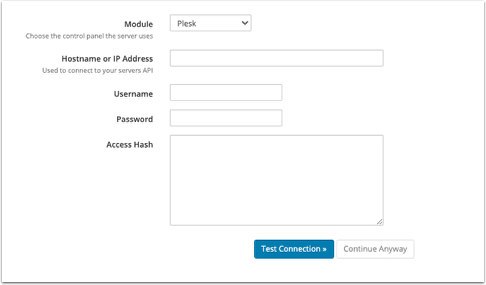
For help with these details, contact your hosting provider or system administrator.
8. Click Test Connection to ensure that WHMCS is able to communicate. A success message will appear.
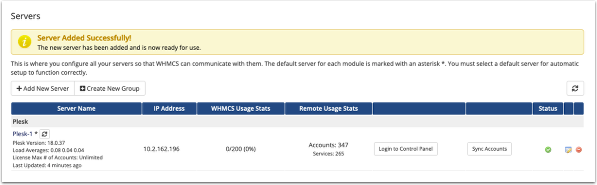
9. Click Save Changes. The Servers interface will appear, displaying the newly-added server in the list.
Related Articles