WHMCS
How to Configure VAT and Collecting VAT IDs for Europe
How to Configure VAT and Collecting VAT IDs for Europe You can configure WHMCS to charge VAT on purchases and collect VAT IDs from clients on the order form. WHMCS cannot provide tax advice or substitute…

How to Configure VAT and Collecting VAT IDs for Europe
You can configure WHMCS to charge VAT on purchases and collect VAT IDs from clients on the order form.
WHMCS cannot provide tax advice or substitute for a tax expert. We recommend seeking appropriate advice from your local tax and VAT authorities.
Configure Tax Rules
To configure WHMCS to collect VAT:
1. Log in to the WHMCS Admin Area.
2. Go to Configuration > System Settings > Tax Configuration.
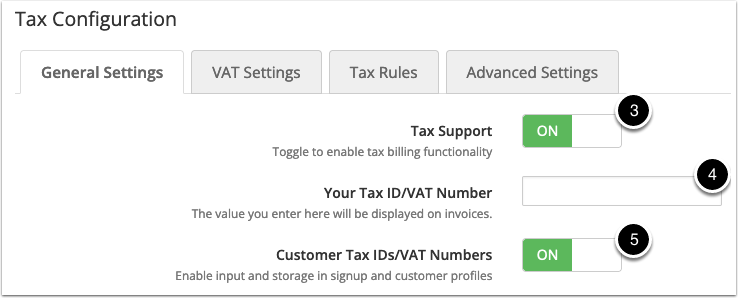
3. Set Tax Support to ON.
4. To display your own VAT ID on invoices, enter it for Your Tax ID/VAT Number.
5. Set Customer Tax IDs/VAT Numbers to ON.
6. Click Save Changes.
7. Select the VAT Settings tab.
8. Set VAT Mode to ON.
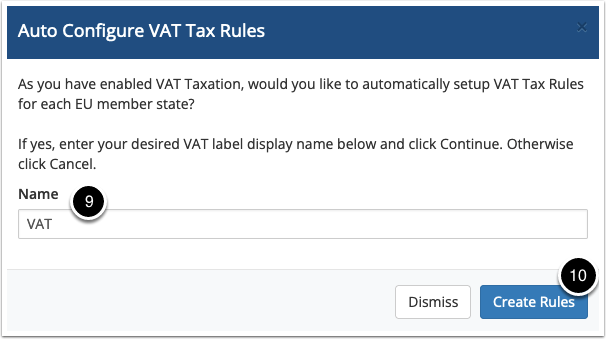
9. This will automatically display a window allowing you to set your VAT label display name (Eg. VAT, IVA, GST).
10. Click Create Rules.
There are a number of other optional settings available on this page, to learn about them see Tax Configuration.
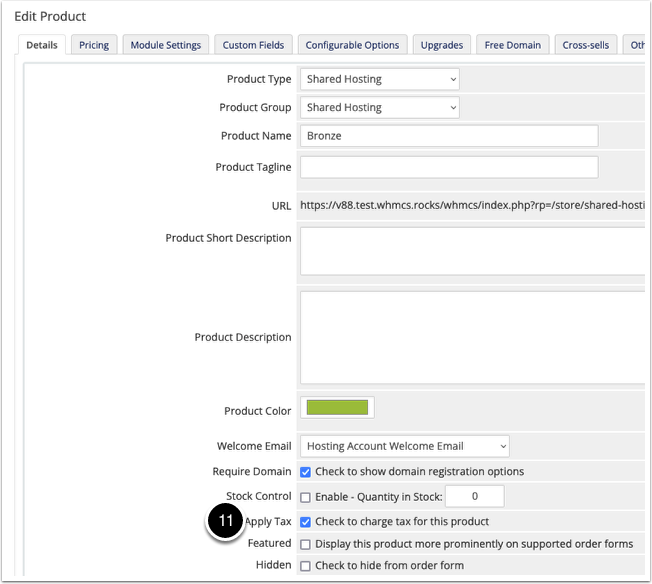
11. Choose the items and products to tax using this configuration. For more information, see Tax Configuration.
Related Articles